Know when a resident is on the floor, not at the next check

Floorcall is AI on care-home room cameras. It alerts your night staff when a resident is on the floor, getting up or leaving the room, with a short blurred clip. Nobody watches live.

Free, answer in two working days. An alert for your staff, not a replacement for night checks.

Footage: Mixkit, not a customer
  • Three night alertsOn the floor, getting up, leaving the room.
  • Blurred clips onlyNobody watches live. The resident picks the image level.
  • Consent firstA room stays off until consent is recorded.
  • £39 a roomA month. Published price, no site fee.

A night check sees the room for a moment. A resident who falls just after one can be on the floor until the next.

The checks carry on. Floorcall is the alert in between, and your staff decide what happens next. No system catches every fall.

Three moments in the night your staff should know about

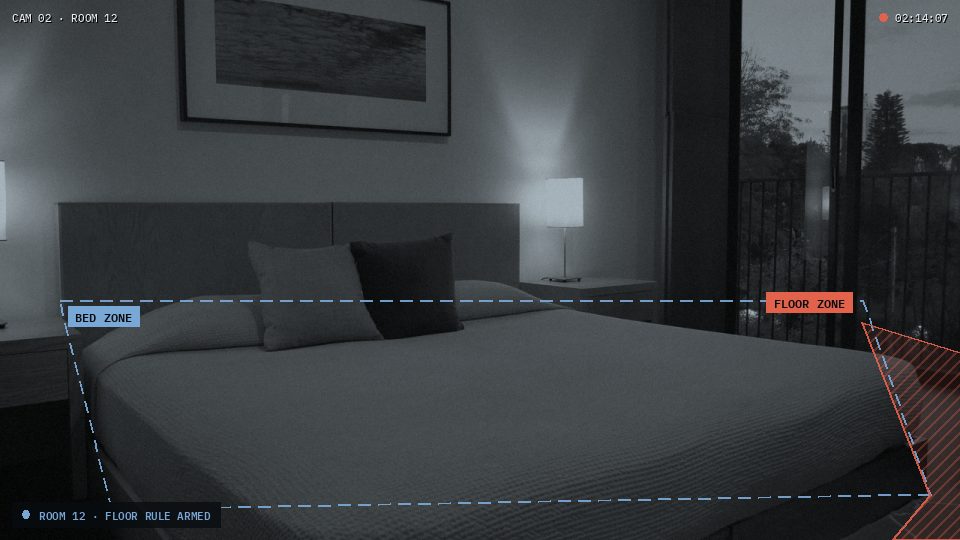
An alert with the room and the time on the floor, so staff know where to go first.

An empty bedroom in night vision with the bed zone and the floor zone markedA resident on the floorRoomRoom 12 · bedroomSawPerson in the floor zoneRuleFloor zone, all nightSentStaff phone · blurred clipSample readout. Zones marked on a stock photo of an empty room. We never stage a fall.

A warning when a resident sits on the bed edge, leaves the bed or stays out too long. You set it for each resident.

Silhouette view of a bedroom: a pale outline of a person sitting on the bed edge and a carer standing nearby, no detail visibleSitting up or getting out of bedRoomRoom 4 · bedroomSawSitting on the bed edgeRuleSet for this residentSentStaff phone · silhouette clipSample readout. Silhouette view of stock footage (Mixkit), not a resident.

For residents who walk at night: an alert when someone leaves their room during the hours you choose.

Out of the room during hours you setCameraCorridor ASawPerson leaving Room 7Rule23:00 to 07:00SentStaff phone · blurred clipSample readout. Our overlay on stock footage, not a care home. Face blurred.

People footage: Mixkit. Camera views: stock imagery (Mixkit, Pexels) with our overlay, not a care home. Tags are illustrative.

The resident chooses what staff see

Each alert carries a few seconds from before and after the moment. The resident, or the person who speaks for them, picks the image level. Nobody can look into a room live.

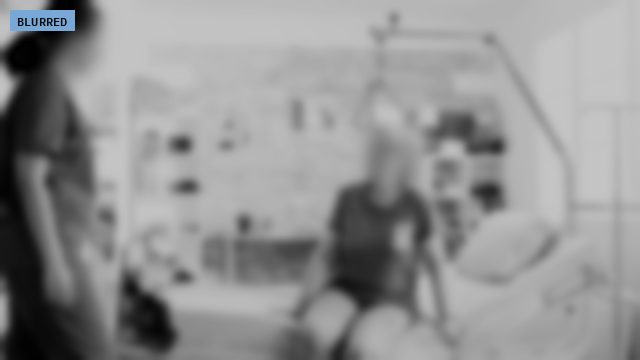
  1. A bedroom scene blurred so heavily that only soft shapes of two people and a bed remain
    01Blurred

    Shape and movement, no detail.

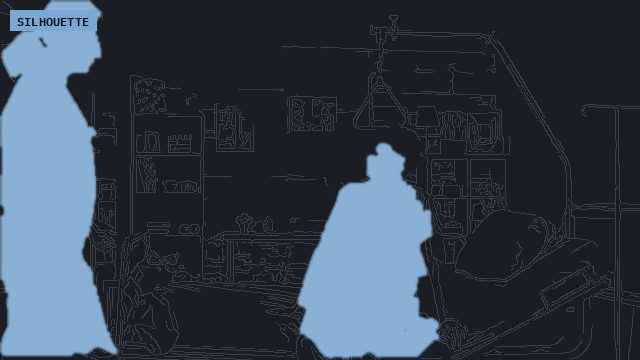
  2. The same scene as plain pale silhouettes on a dark outline drawing of the room
    02Silhouette

    An outline of the person and the room.

  3. Floorcall alertSitting upRoom 4 · 01:47
    03No image

    The alert alone: event, room and time.

The same sample moment at each level. Stock footage (Mixkit), not a resident.1

Before a room goes live

  • Consent is recorded for that resident. If a resident can’t consent, the room stays off until a best-interests decision is recorded.
  • You choose the rooms, one resident at a time, where a care plan calls for it. It isn’t built for blanket use.
  • Our free Room Monitoring Consent Kit gives you a best-interests template, a family letter and a resident information sheet.
  • Staff can pause a room at any time, for personal care or a visit.

What it never does

  • Let anyone look into a room live.
  • Recognise faces.
  • Score or time your staff. It looks at the room, not at them.
  • Replace night checks or care. It is an alert and a record.
  • Promise to catch every fall. No system does.

An alert in the night. A report in the morning.

Night staff get the alert on a phone. The manager gets a night report and a falls log to show the family, the ICB or the inspector.

The morning night report1
FloorcallNight reportSample layout · not real data

Sample night, 22:00 to 07:00

Home
Sample home
Rooms live
8
Alerts
5
False alerts
1

Alerts by hour

  1. 220 alerts
  2. 231 alerts
  3. 000 alerts
  4. 011 alerts
  5. 021 alerts
  6. 031 alerts
  7. 040 alerts
  8. 051 alerts
  9. 060 alerts

Every alert

TimeRoomEventAttendedClip
23:40Room 9On the floorFalse alert: a blanket on the floor23:43Blurred
01:47Room 4Sitting up01:50Silhouette
02:14Room 12On the floor02:15Blurred
03:05Room 7Left the room03:09Blurred
05:32Room 4Out of bed05:34Silhouette

Falls log

Room 12, on the floor
02:14
Attended by night staff
02:15
Time on the floor
5 min
Clip kept
Blurred

The real report adds paused rooms, rooms without consent and an export of the falls log. False alerts are always listed.
The alert on a staff phone1
Floorcall alertSample

Sitting up · Room 4

Silhouette clip: a pale outline of a person sitting on the bed edge, no detail visible
Time
01:47
Saw
Sitting on the bed edge
Clip
Silhouette, as the resident chose
Attend

The first nights are quiet while we tune each room. Alerts go live once you’ve read the night-7 report, which lists every alert and every false alert.

Cameras in the rooms you choose. The rest is remote.

  1. Room cameraA standard infrared camera in each bedroom you choose, fitted by your installer.
  2. The connectorSmall software on a PC you already have. We install it remotely and ship nothing.
  3. One connection outEncrypted and outbound-only, to our cloud.
  4. FloorcallAI checks each room for the three moments and keeps only short event clips.
  5. Your night staffAn alert on a staff phone. A night report for the manager each morning.

What you need

  • A camera in each bedroom you choose: a standard infrared IP camera, bought through your installer and yours to keep. We sell no hardware.
  • Corridors and lounges: the CCTV you already have can usually connect, with nothing new.
  • A PC that stays on and an internet connection. The free check includes an upload speed test.
  • A phone for the night staff on shift.

Where the video goes

  • Video leaves the home. It travels encrypted to our cloud, where the AI checks it.
  • Only short event clips are kept, at the image level the resident chose.
  • How long clips are kept and where they are stored are confirmed in writing before any room goes live.
  • The pilot comes with a Data Protection Pack: data flows, a security sheet and a draft impact assessment for you to adapt.

Try it for 60 nights. Pay only if it was worth it.

Start with a free readiness check on your own rooms, then decide whether a pilot is worth it.

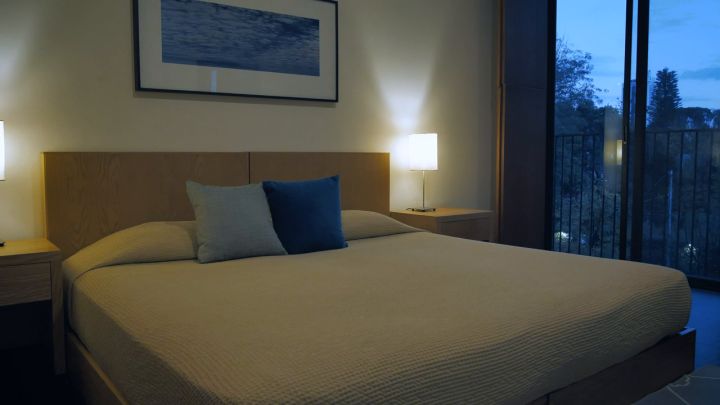
A photo of an empty bedroom with a made bed, a lamp and a windowThe same room in night vision with the bed zone and the floor zone drawn on it
The free readiness check, one roomExample on a stock photo of an empty room, not a care home. Drag the line to compare.
  1. 01

    Free readiness check

    Send photos of the empty rooms you have in mind. In two working days you’ll know which rooms will work and where each camera goes, with a costed plan.

    Free

  2. 02

    60-Night Safer Nights Pilot

    Up to 8 rooms. Billed on night 60 and credited against your monthly fees.

    £490

    • Night 1Your first night report the next morning.
    • Night 7Proof report: every alert, every false alert.
    • Night 14Alerts live in every pilot room.
    • Night 60Evaluation report, then you decide.
  3. 03

    Keep it running

    No site fee, stop any month. Or £420 a room paid yearly. The first 15 founding homes keep this price for 18 months in return for a case study.

    £39per room, per month

The Night-60 Guarantee

If you decide at night 60 that the pilot wasn’t worth it, you pay nothing for it. No conditions.

Get my free readiness check

If alerts aren’t live in every pilot room by night 14, we extend the pilot free.

The pilot includes the Consent Kit filled in with you, night-staff training on calls, the Data Protection Pack and a costed plan you can put in an ICB or council bid. Not included: bedroom cameras and fitting by your installer.

Before you send a photo

01Do we need new cameras?

In bedrooms, yes: a standard infrared camera in each room you choose, fitted by your installer. Existing corridor and lounge CCTV can usually connect. We sell no hardware and ship nothing.

02Does video leave the home?

Yes. It travels encrypted to our cloud, where the AI checks it. Only short event clips are kept, at the image level the resident chose. Nobody can view a room live.

03What if a resident can’t consent?

The room stays off until a best-interests decision is recorded. The free Consent Kit has a template for that, a family letter and a resident information sheet.

04Does it replace night checks?

No. It is an alert and a record between checks. Your staff and your checks carry on as they are.

05Will it catch every fall?

No system does, and we don’t quote an accuracy figure. Night vision, blankets and slow slides from a bed are hard. That is why the first nights are quiet, and why the night-7 report counts every false alert before anything goes live.

06What AI does it use?

Computer vision that finds a person and their posture in the camera view, then applies the rules you set for each room. There is no facial recognition and nobody is scored.

07Is it approved by a regulator?

No, and we won’t claim any regulator’s approval or endorsement. You get the consent record, the data flows and a draft impact assessment, so you can make and document your own decision.

Find out which of your rooms will work

Send a few photos of empty rooms. In two working days you’ll know which rooms work and where each camera would go. Free, and no call.

  1. 01Send photos of the rooms, with nobody in them
  2. 02We reply within two working days
  3. 03You decide. No call needed